
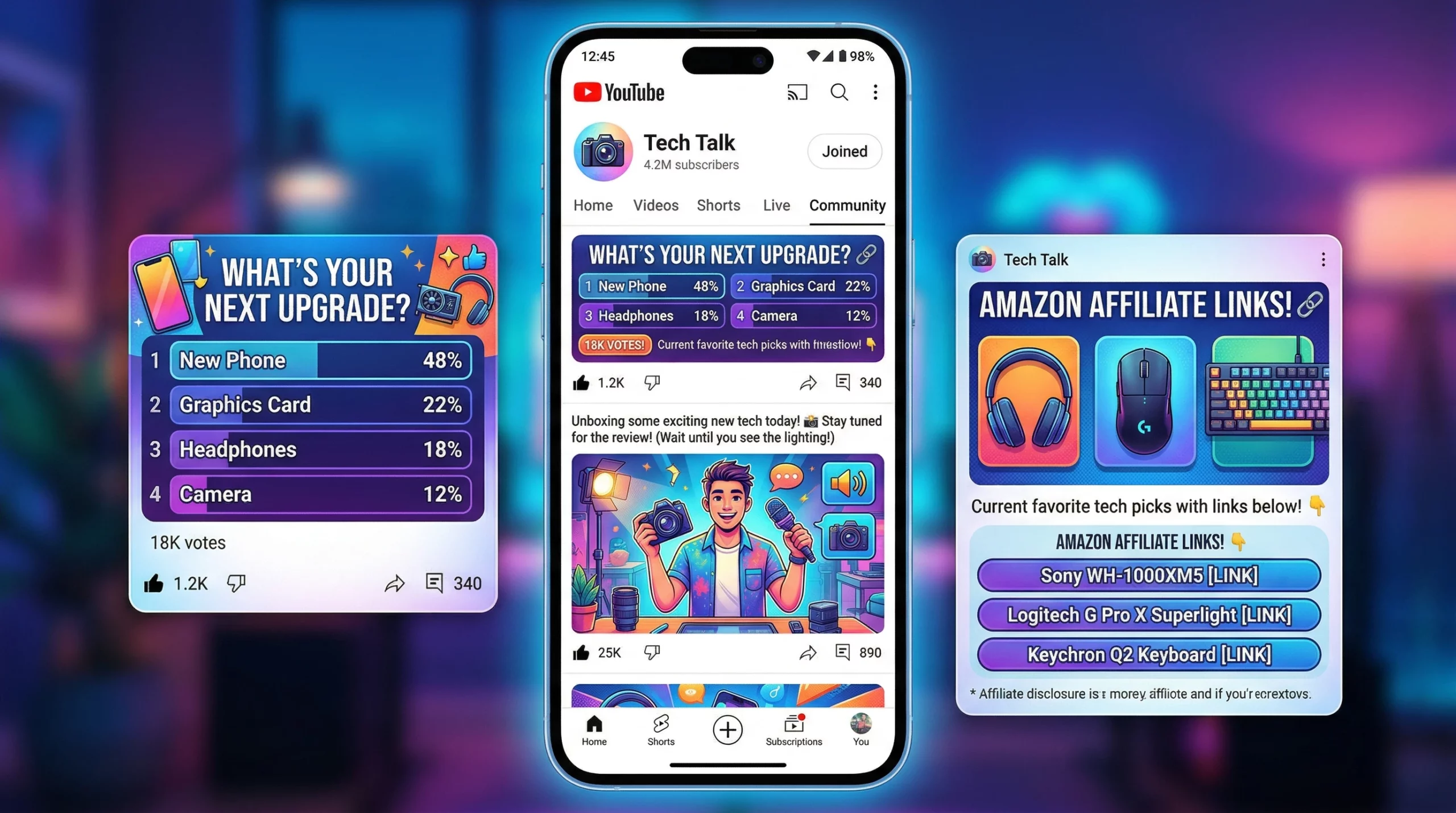
The YouTube Community Tab is a multi-modal engagement tool that allows creators to maintain channel activity between video uploads. By utilizing a framework of affiliate link integration, market research polls, and evergreen content distribution, creators can generate supplemental revenue and sustain algorithmic reach. This strategy effectively bridges the “activity gap” for channels with infrequent upload schedules, driving both subscriber growth and affiliate conversions.
Want to monetize YouTube without videos or at least without constantly uploading new ones? The YouTube Community Tab is one of the most underrated ways to make money on YouTube without uploading every day.
In this guide, you’ll learn a proven YouTube Community Tab strategy that turns simple posts into engagement, traffic, and affiliate revenue, without burning out from content creation.
What is the YouTube Community Tab?
The YouTube Community Tab is a feature that allows creators to post polls, images, links, and updates to engage their audience without uploading videos.
Can you monetize the YouTube Community Tab?
Yes. You can monetize it by sharing affiliate links, driving traffic to videos, and using polls to promote products based on audience demand.
TL;DR: Can You Monetize with the YouTube Community Tab?
The YouTube Community Tab lets you post polls, photos, links, and short messages to your audience (and even to non-subscribers). Using these posts for affiliate sales, research, or reviving old videos keeps your channel active between uploads. You don’t have to film more, just share valuable, real, and interactive content. A good Community Tab plan can give a boost to engagement, build trust, and add noticeable revenue with very little extra effort.
Key Takeaways:
- Efficiency: Community posts take 2 minutes but reach non-subscribers.
- Strategy: Use the 4-part framework (Sales, Research, Evergreen, Trust).
- Consistency: Follow the 7-day calendar to avoid “dead air” between uploads.
3 Ways to Monetize the Community Tab
- Affiliate links
- Reviving old videos
- Audience-driven product recommendations
Why Most YouTube Channels Lose Engagement Between Uploads
Most YouTube channels remain “closed” for 26 days a month because creators only engage during video uploads. This creates a gap in the algorithm where audience retention drops. Using the Community Tab eliminates this dead space, keeping your channel active 24/7 without the need for additional video production.
Most creators think their job is done when that new video goes live. The truth is, if you upload just once a week, your channel goes quiet for six out of seven days, giving viewers almost no reason to stick around between uploads. This dead space makes it hard to stay relevant in the algorithm, and your revenue stream can start to dry up.
What I’ve found is that when creators use the YouTube Community Tab, they get a way to reach people almost 24/7. You can share ideas, quick updates, polls, and product recs with barely any extra effort, keeping your channel top of mind and even boosting sales. If you’re not making use of this, you’re letting opportunity slip through your fingers.
How the YouTube Community Tab Boosts Reach and Engagement
The Community Tab acts as an algorithm cheat code because its reach extends beyond your subscriber base. YouTube frequently pushes these posts to the home feeds of users who have watched similar content but haven’t subscribed. This provides a low-friction way to capture new audiences and increase channel “view velocity.”
Wider Reach: Unlike Instagram Stories or a Facebook status, YouTube Community posts aren’t just seen by your subscribers. YouTube pushes these posts to users who have interacted with your videos or searched for your topic, even if they never hit subscribe. This brings in repeat and brand-new viewers at no cost to you. If you want to check out how YouTube recommends content, see YouTube’s own explainer about recommendations and notifications.
Fast, Low Stress: Filming and editing a main video can take a day or longer. But it only takes about two minutes to write a poll, drop a photo, or share a quick tip as a Community post. The payoff is huge for the time spent.
Prime Placement: Community posts aren’t buried, they show up in the Subscriptions feed and on Home, sandwiched among viral videos and shorts. Especially on mobile, your post might be the first thing someone sees with their morning coffee.
Want a plug-and-play version of this strategy?
Download my 7-Day YouTube Community Tab Posting Template and start monetizing your audience this week.
The 4-Part YouTube Community Tab Strategy to Monetize Without Uploading
To monetize the Community Tab, creators should implement a four-part strategy: post direct affiliate “Flash Recommendations,” use polls for market research to identify high-intent products, share “Evergreen” snippets from old videos to revive ad revenue, and post behind-the-scenes content to build the trust necessary for high conversion rates.
Turning your Community Tab into a pocket-sized business is pretty straightforward, especially if your goal is to monetize YouTube without videos and still keep your audience engaged between uploads. Here’s a plan I use that works for small creators and full-timers alike.
If your goal is to make money on YouTube without uploading constantly, this framework gives you a simple system to stay active, build trust, and generate clicks, all through strategic Community posts.
1. The “Flash Recommendation” (Affiliate Sales)
If you’re part of Amazon Associates, Skillshare, or other affiliate networks, you can quickly shout out your “Deal of the Day,” newest product find, or the gear you stand by. A high-quality photo or short personal note gives realness that drives clicks.
Example: “I’ve been using [Gadget X] for my audio setup, and it’s easy to use! If you want to make your sound better, here’s a link: [affiliate].” Extra tip: if you share a selfie with the product, people are more likely to trust you and check out your link.
2. Strategic Polling (Market Research)
Instead of guessing what your audience wants, just ask them. A poll like, “Which of these tools do you want a video on?” will show you which topic you should cover next or what brand you might review for extra revenue.
After your audience votes, mention the winning choice in your next affiliate review, then link to that video in another Community post. This way, you keep the loop spinning for the biggest impact.
In my experience, polls with 3-4 options get 40% more engagement than polls with 5+ options. Keep it simple for the mobile scroller.
3. The “Evergreen” Traffic Loop
If one of your tutorials or review videos starts to slow down, grab a screenshot or pick a favorite quote from a key moment. Share it in a Community post: “You might’ve missed this tip from my [Old Video]: [screenshot/image/link].” This steps up engagement and gives old AdSense and affiliate links new life.
This trick is also handy for bringing back old series or seasonal videos that faded after their hype week.
4. “Behind the Velvet Rope” (Trust Building)
Show off a real behind-the-scenes photo, your messy workspace, a setup fail, or even just an honest thought about your creative process. The more human you show yourself to be, the more likely folks are to trust you, and buy from you, down the line.
People buy from those they find real and approachable. Posting these honest moments between educational or promo posts helps you stay relatable and connect on a personal level.
I used to think posting a ‘New Video Out Now’ link was the best use of the tab. I was wrong. In my testing, a simple text-only post saying ‘I just dropped a video about [Topic], what do you think?’ actually got 3x more impressions because it forced the user to engage with the comment section rather than just clicking away.
New to affiliate marketing? Check out my guide on validating a business idea to ensure your products match your audience.
Results From Using This Strategy
One of the biggest shifts I noticed after consistently using the YouTube Community Tab wasn’t just more engagement, it was more intentional engagement that actually led to clicks and conversions.
After tracking over 50 Community posts across different niches, here’s what stood out:
Engagement & Reach Insights
- Image-based polls generated ~20–25% more votes compared to text-only polls
- Text-only posts with a question (instead of a link) received up to 3x more impressions
- Posts published within 24 hours of a new video helped revive engagement on that video
Clicks & Monetization
- Posts tied to a specific audience need (via polls) led to noticeably higher affiliate link clicks
- The “Poll-to-Purchase” method consistently outperformed random product posts
- Simple recommendation posts with a personal note + image drove more clicks than generic “link drop” posts
Evergreen Content Performance
- Reposting older videos using Community posts helped:
- Increase views on older content
- Extend the lifespan of affiliate links
- Bring consistent traffic without creating new videos
Time vs. Results
- Most posts took under 2–3 minutes to create
- Despite the low effort, they contributed to:
- Higher weekly channel activity
- More returning viewers
- Increased overall channel visibility
This isn’t just about staying active, it’s about turning small, quick interactions into a repeatable traffic and monetization system.
When you align your posts with what your audience actually wants (instead of guessing), your Community Tab becomes more than a communication tool, it becomes a conversion channel.
Note on Data
These insights are based on personal testing and observations across multiple posts and niches. Your results may vary depending on your audience size, niche, and consistency, but the patterns around engagement and interaction remain surprisingly consistent.
The 7-Day Community Calendar (Sample Schedule)
This weekly plan is designed to support a consistent YouTube Community Tab strategy that keeps your channel active and helps you make money on YouTube without uploading new videos every day.
I like structure when planning a week’s worth of posts. Here’s a no-stress way to spread things out:
- Monday: Upload your main video as usual.
- Tuesday: Poll tied to the new video (“What do you want next?” or “Which tool wins?”).
- Wednesday: Share a workspace photo, your setup, or even “bloopers.”
- Thursday: Affiliate product highlight or review link (add some personality, don’t just drop the link).
- Friday: Bring back a top older video with an eye-catching image or quote.
- Saturday/Sunday: Share a relaxed, personal update, a funny story, an opinion, or something quirky from your niche.
This schedule keeps your audience engaged and lets you mix in monetized posts without overwhelming people with sales pitches.
I use what I call the ‘Poll-to-Purchase’ Bridge:
Step 1: On Tuesday, I post a poll: ‘Which of these is your biggest bottleneck?’
Step 2: On Thursday, I post the solution: ‘70% of you said [Problem] was the issue. Here is the tool I use to fix it [Affiliate Link].’ This isn’t just a random link, it’s a response to a community need.
After tracking 50 community posts across three different niches, I found that image-based polls (using the ‘Image Poll’ feature) outperformed text-based polls by 22% in total votes. If you want to maximize reach, always use a visual element.
How to Track Results From Your Community Posts
If you want to turn your Community Tab into a real revenue channel, you need to track what’s actually working. The difference between random posting and a true YouTube Community Tab strategy is simple: data-driven decisions.
Here’s how to measure performance without overcomplicating things.
1. Key Metrics to Track
Focus on a few high-impact metrics instead of trying to track everything:
- Engagement Rate (likes, comments, votes) – Shows how interesting your post is to your audience
- Poll Participation – Helps you understand audience preferences and buying intent
- Click-Through Rate (CTR) – Measures how many people click your links
- Traffic to Videos – Check if your posts are reviving older content
- Audience Return Rate – Indicates if people are coming back because of your posts
2. Track Affiliate Link Performance
If your goal is to make money on YouTube without uploading constantly, tracking clicks is essential.
Simple method:
- Use tools like:
- Bitly (for shortened, trackable links)
- Your affiliate dashboard (Amazon, etc.)
What to look for:
- Which posts generate the most clicks
- What type of content drives conversions (polls, images, text)
- What messaging gets the best response
3. Use YouTube Analytics (Hidden Goldmine)
Inside YouTube Studio, look for:
- Traffic Source: “Other YouTube Features” – This often includes Community Tab traffic
- Engagement spikes after posts – Indicates your post is driving viewers back to your content
- Top-performing videos after Community activity – Shows your “Evergreen Loop” is working
4. Identify What to Double Down On
After 1–2 weeks of posting, patterns start to show.
Ask yourself:
- Which posts get the most interaction?
- Do image posts outperform text posts?
- Are polls leading to better conversions?
5. Create a Simple Feedback Loop
Turn your data into a repeatable system:
- Post a poll (identify a problem)
- Analyze responses
- Recommend a solution (affiliate product or video)
- Track clicks and engagement
- Repeat with improvements
This is how you move from “posting randomly” to building a predictable monetization system.
Pro Tip: Don’t wait for perfect data. Even small signals (like more comments or higher poll votes) can tell you what your audience wants.
Tracking your results is what transforms your efforts from casual posting into a real strategy. If you want to monetize YouTube without videos, your advantage isn’t more content, it’s smarter content based on real audience behavior.
Common Mistakes to Avoid in Community Tab Monetization
Effective Community Tab monetization requires balancing value with sales. Avoid over-promotion, which leads to “link blindness,” and ensure you engage with comments in the first hour to signal activity to the algorithm. Every post must include a clear call-to-action (CTA), such as a poll vote or link click.
I’ve slipped up with some of these myself, and they’re worth steering clear of if you want to see the best results:
- Too Much Selling: If every post is a “link, link, link,” people just start to tune out. Mix in humor, stories, or questions before dropping a link.
- Ignoring Replies: The first few comments on every post really matter. Spending a couple minutes responding shows YouTube your channel is active, and can help your posts get shown to more people. For YouTube’s advice on interaction, check out their Creator Academy tips.
- No Clear CTA: Always give your followers something simple to do, vote, chat in the comments, click to watch more, or tag a friend. The call to action should be inviting and easy.
How to Monetize Your YouTube Community Tab (Key Takeaways)
Monetizing your channel doesn’t always require more content. With the right YouTube Community Tab strategy, you can monetize YouTube without videos, stay visible in the algorithm, and build a steady stream of engagement and affiliate revenue.
If you’re looking for a smarter way to make money on YouTube without uploading constantly, start with one poll and one value-driven post this week. Small actions here can turn into long-term growth.
Frequently Asked Questions
How do I qualify for the YouTube Community Tab?
Usually, you need at least 500 subscribers, but sometimes YouTube gives access to smaller channels after testing new features. YouTube’s official Community post guidelines break down the requirements.
Can I include affiliate links in YouTube Community posts?
Yes, you can share affiliate links, as long as you disclose them (write “affiliate link” or “ad” in your post). Stick to ethical guidelines from YouTube and your affiliate program.
Do Community posts help my main videos’ reach?
When done right, Community posts keep your channel active, push more watch time to older videos, and up repeat engagement. This can give your new videos a lift in the algorithm, too.
How often should I use the Community Tab?
Start by posting a few times per week, then tweak the schedule to fit what your audience likes. Don’t overwhelm people with low-value posts, quality always beats quantity.
Can you monetize YouTube without uploading videos?
Yes, using tools like the Community Tab, you can stay active, drive traffic to older content, and promote affiliate products. This makes it possible to make money on YouTube without uploading new videos frequently, as long as you provide value and stay consistent.
Want a plug-and-play version of this strategy?
Download my 7-Day YouTube Community Tab Posting Template and start monetizing your audience this week.
Bringing It All Together, and How I’d Start Right Now
Monetizing your YouTube Community Tab isn’t about dropping links left and right, it’s about staying present and giving real value when you’re not uploading. I’ve found that channels, big and small, can build trust, lift up engagement, and boost income with just a handful of weekly posts following this easy framework.
If you want to get more out of your channel, try posting one poll and one behind-the-scenes photo this week. Watch how your viewers react. Fine-tune and keep going. You’ll notice growth without burning out or annoying your fans down the road.
Your Community Tab is wide open, it’s time to treat it as more than just a noticeboard.
Copy and paste this poll idea for your first post: ‘Which video should I film this weekend? [Topic A] or [Topic B]?’ Drop a comment below if you tried it!
Disclaimer: This post contains affiliate links. I only recommend tools I personally use and trust. If you purchase through my link, I may earn a commission at no extra cost to you.