
How To Create Content That Converts
Creating content that converts requires more than attracting visitors, it requires guiding readers toward a meaningful action. High-converting content combines audience research, search intent, clear messaging, trust-building, and well-placed calls to action to encourage subscriptions, downloads, inquiries, or purchases. This guide explains the practical strategies that help turn content into measurable business results.
Creating content is easy. Creating content that converts readers into subscribers, customers, or loyal followers is much harder.
Whether you’re writing blog posts, social media updates, videos, or email newsletters, the goal isn’t just to attract traffic, it’s to encourage meaningful action. In this guide, I’ll share the strategies I’ve learned through creating online content, including practical techniques for understanding your audience, building trust, and writing compelling calls to action that turn readers into engaged customers.
What Is Content That Converts?
Content that converts is content designed to encourage readers to take a specific action, such as subscribing to a newsletter, downloading a resource, making a purchase, or contacting a business. It combines valuable information, trust, clear calls to action, and an understanding of user intent to move readers from interest to action.
Content that converts is content designed to encourage readers to take a specific action, such as subscribing to a newsletter, downloading a resource, making a purchase, or contacting a business. It combines valuable information, trust, and clear calls to action to move readers from interest to action.
Quick TL;DR on Content That Converts
- Know your audience before creating content.
- Match your content to the reader’s stage of the buying journey.
- Write headlines that promise clear value.
- Build trust with examples and experience.
- Include one clear, compelling call to action.
- Review your analytics and improve over time.
According to Google Search Central, content should be created primarily to help people rather than simply rank well in search results. The pages that tend to perform best combine original insights, practical experience, and information that genuinely solves the reader’s problem.
The C.O.N.V.E.R.T. Framework
C – Connect with your audience
O – Optimize for search intent
N – Nail the headline
V – Verify with trust and proof
E – Encourage action
R – Review performance
T – Test and improve
Start With Real Audience Understanding
Effective content begins with understanding your audience’s goals, challenges, and language. Researching customer questions, analyzing website data, and gathering direct feedback helps you create content that addresses real needs, making readers more likely to trust your advice and take the next step.
Nothing’s going to work if you don’t know who you’re talking to. Building content that clicks with people takes a bit of research and a lot of empathy. I usually start with a good look at the main questions my audience asks. Forums, social comments, and even direct messages offer a goldmine here. Insights from Google Analytics or social analytics also reveal what’s already connecting (and where people drop off or bounce).
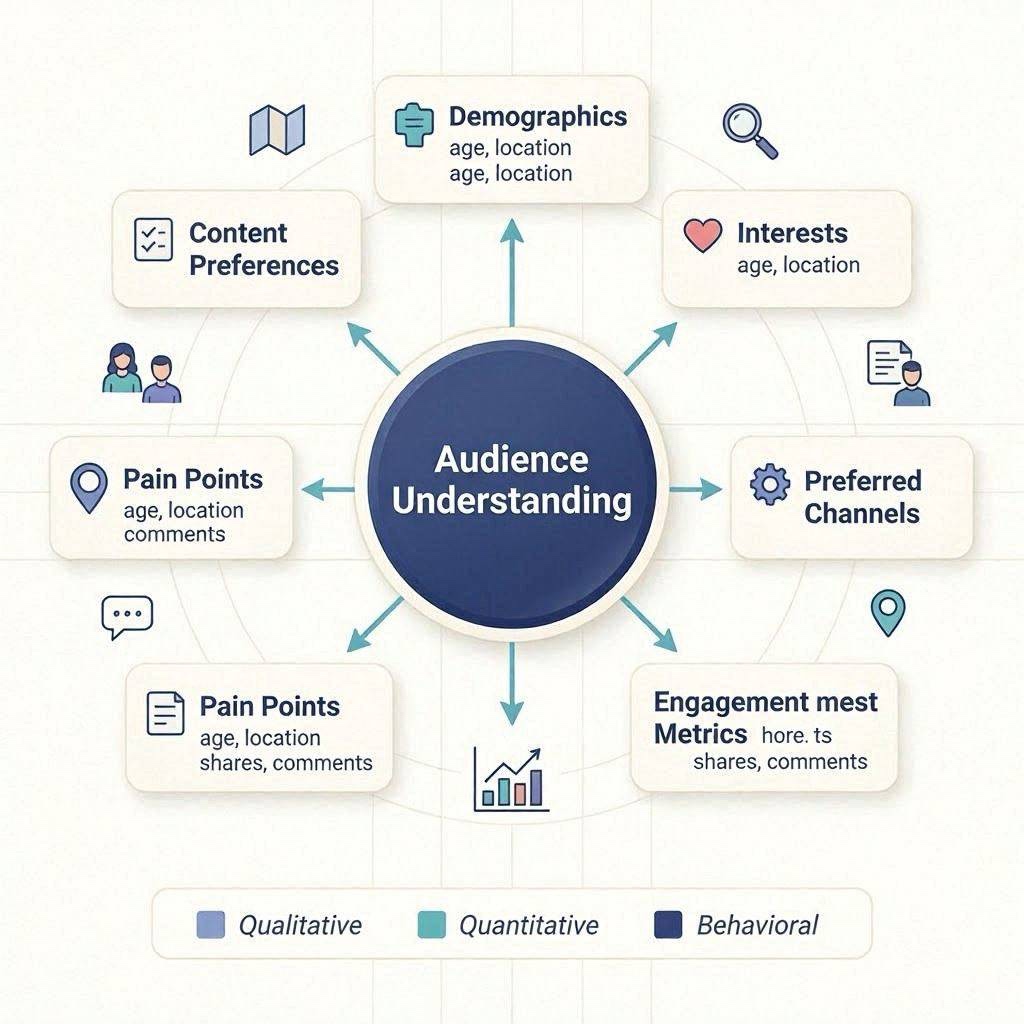
Beyond data, chatting with a few real people goes a long way. I make it a habit to ask open-ended questions in comments, emails, or even short Instagram polls. Sometimes I dig into industry-specific groups for inspiration about common frustrations my audience faces.
- Sketch Out Personas: These aren’t just made-up profiles. They help boil down the “why” and “how” behind audience actions. Think: What keeps this person up at night? What’s their day look like?
- Survey Real People: Super practical, quick polls, DMs, or email replies shed light on actual stumbling blocks straight from your community.
- Dig Into Language: Mirror back the words your audience uses. That sense of “They get me” makes content stickier and lowers resistance to your calls-to-action (CTAs).
Subscribe to Qualify Wealth
Match Your Content to Search Intent
Content performs better when it matches the reader’s search intent. Informational content should educate, commercial content should compare options, transactional content should encourage action, and navigational content should help users quickly find the specific resource or website they’re looking for.
Even the best-written content won’t convert if it doesn’t match what the reader is actually looking for. Before you start writing, ask yourself: What does someone hope to achieve by searching this topic? Aligning your content with search intent helps readers find the answers they need and makes them more likely to take the next step.
Most online searches fall into one of these categories:
Informational Intent
People are looking for answers, advice, or step-by-step guidance. They’re learning, researching, or trying to solve a problem.
For example, someone searching for “how to create content that converts” wants practical tips and proven strategies, not a sales pitch.
Best CTA: Invite them to download a checklist, subscribe to your newsletter, or explore a related guide.
Commercial Investigation
At this stage, readers know they need a solution and are comparing different options before making a decision.
Searches like “best content marketing tools” or “Grammarly vs Hemingway” show they’re evaluating products or services.
Best CTA: Recommend a detailed comparison, case study, product demo, or free trial.
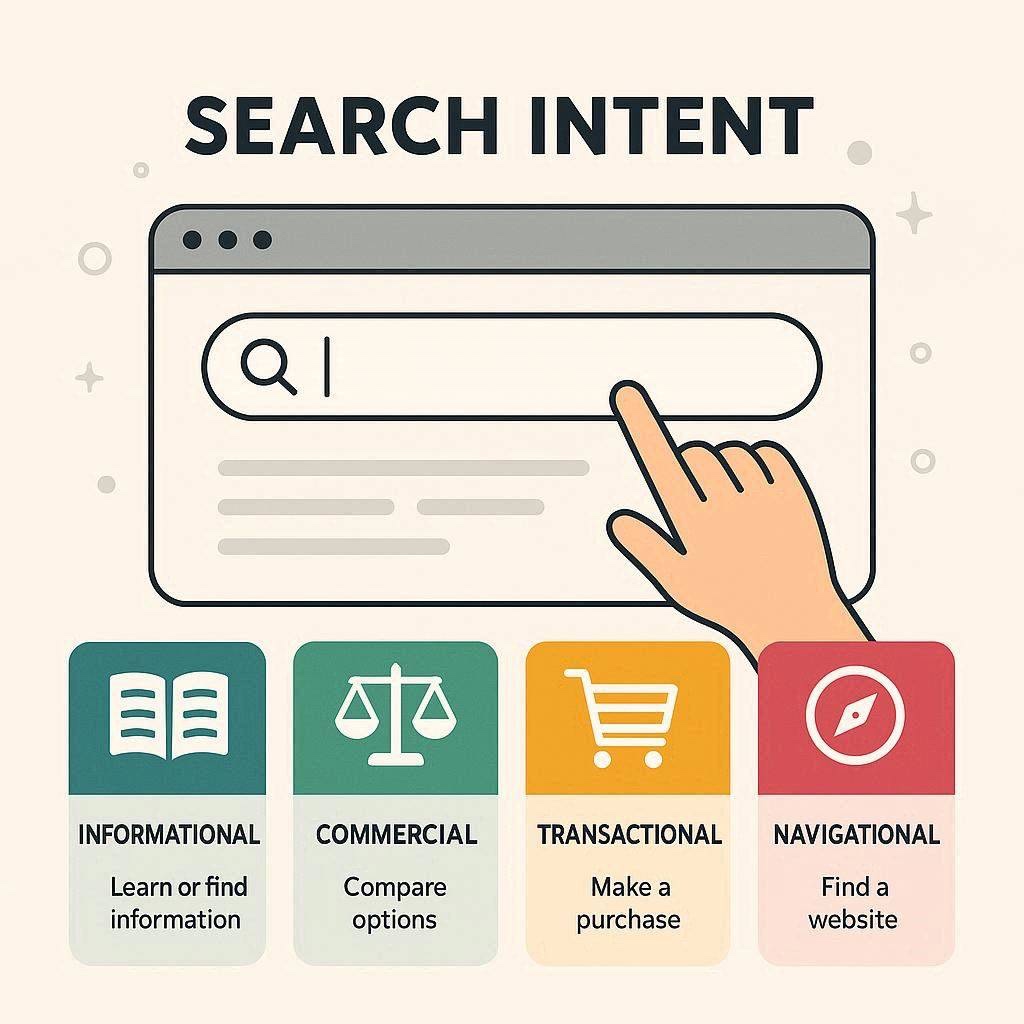
Transactional Intent
These visitors are ready to take action. They’re looking to buy, sign up, or start using a product or service.
Searches such as “buy email marketing software” or “join an SEO course” indicate strong purchase intent.
Best CTA: Make it easy to get started with a clear button, simple signup process, or direct purchase link.
Navigational Intent
Sometimes people already know where they want to go and use a search engine to find a specific website or brand.
For example, someone searching for “Wealthy Affiliate login” or “Canva templates” isn’t looking for general information, they want a particular destination.
Best CTA: Help them quickly find the resource they’re looking for or direct them to the most relevant page.
The better your content matches the reader’s intent, the more natural your calls to action will feel. Instead of pushing visitors toward something they’re not ready for, you’re guiding them to the next logical step in their journey. That creates a better user experience and often leads to higher engagement and conversion rates.
Set Clear, Action Focused Goals for Every Piece
Every piece of content should have one primary conversion goal. Whether you want readers to subscribe, download a guide, request a consultation, or make a purchase, focusing on a single objective creates a clearer user journey and improves conversion opportunities.
If you don’t know what you want people to do after they read or watch, you’re flying blind. Every time I outline a piece (even a tweet), I nail down the main action I want to encourage. Is it subscribing? Scheduling a demo? Sharing with a friend? Even “leave a comment” can be a meaningful conversion for some projects.
Even for content that feels ‘just informational’, giving someone one obvious step (like “check out our FAQ” or “download this resource”) can build that habit of engagement.
- Keep It Simple: One key action per piece works best. Multiple CTAs can get overwhelming and start to blend together.
- Map Content Types to Funnel Stages: Topofunnel (awareness) content nudges for follows or downloads, while bottomoffunnel (decision) content aims for purchase, booking, or serious signup.
Write Headlines That Capture Attention and Drive Clicks
Strong headlines increase clicks by clearly communicating the value readers will receive. Effective headlines combine relevant keywords, specific benefits, and genuine curiosity without using misleading clickbait, helping both search engines and readers understand what the content offers.
Your headline is often the first, and sometimes the only, chance to convince someone to click. Whether your content appears in Google search results, on Pinterest, social media, or in an email, a compelling headline sets expectations and gives readers a reason to invest their time.
Research by the Nielsen Norman Group has consistently shown that people scan web pages rather than read them word for word. A clear, descriptive headline helps visitors quickly determine whether your content answers their question, increasing the likelihood they’ll continue reading.
A strong headline doesn’t rely on clickbait. Instead, it clearly communicates the value readers will gain while creating enough curiosity to encourage the click. Before publishing, ask yourself: Would I click this headline if I knew nothing about the article?
Here are a few principles I use when writing headlines:
- Lead with the benefit: Tell readers what they’ll learn or achieve. Headlines that promise a clear outcome generally perform better than vague or clever ones.
- Be specific: Numbers, timeframes, and concrete results make headlines more believable. For example, “7 Ways to Improve Your Content Conversion Rate” is more compelling than “Content Marketing Tips.”
- Create curiosity without misleading: Encourage readers to learn more, but always deliver on the promise your headline makes.
- Use strong keywords naturally: Including your primary keyword helps search engines understand your topic while reassuring readers they’ve found the information they were looking for.
- Match the reader’s intent: Someone looking for a beginner’s guide expects a different headline than someone comparing tools or looking for advanced strategies.
I rarely settle on the first headline I write. Instead, I’ll brainstorm five to ten variations and compare them before choosing one. Sometimes changing just a few words can significantly improve click-through rates.
Examples of Stronger Headlines
Instead of:
- Content Marketing Tips
Try:
- 10 Content Marketing Tips That Increase Conversions
Instead of:
- Writing Better Blog Posts
Try:
- How to Write Blog Posts That Convert Readers into Customers
Remember, a great headline gets the click, but the rest of your content has to deliver on its promise. When your headline accurately reflects the value inside the article, you’ll build trust, reduce bounce rates, and encourage readers to keep coming back.
If you want beginner-friendly training, hosting, keyword tools, and community support in one place, Wealthy Affiliate is worth exploring while you build your site.
I’ll be your personal coach from day one.
Content That Guides, Not Just Tells
High-converting content guides readers through a process rather than simply presenting information. Clear explanations, step-by-step instructions, real-world examples, and scannable formatting help readers understand what to do next and make it easier for them to take action.
It’s easy to shout into the void and hope someone listens. Real conversions happen when content walks people through a process. My best-performing guides break steps down simply, with zero jargon and plenty of bullet points or visuals.
Stepbystep instructions, clear illustrations, and relatable metaphors can turn a complicated idea into something actionable.
- Clarity and Simplicity: No fancy words just to sound smart. Plain-spoken guidance builds trust quickly.
- Real Examples: I throw in screenshots, templates, or results from my own work when possible. This proves I’m not all theory.
- Scannable Formatting: Bulleted lists, bolded tips, and short paragraphs all help people grab what they need, fast.
Trust: The Secret Sauce
Trust is built through transparency, personal experience, supporting evidence, and honest recommendations. Including examples, case studies, credible sources, and realistic expectations helps readers feel confident in your advice and increases the likelihood they’ll engage with your content.
Conversions hinge on trust. People need to feel confident that what you’re asking them to do won’t waste their time, money, or attention. This is where personal experience and transparency work overtime. I share when a tool or strategy didn’t pan out and am honest about what I think will work for most folks versus what requires a special touch.
Over time, consistency in your messaging and tone also helps readers get a sense of your values before they even interact directly.
- Show Proof: Screenshots, testimonials, and anecdotes from clients or readers make abstract advice concrete.
Trust is one of the biggest factors influencing buying decisions. According to the Edelman Trust Barometer, people are significantly more likely to engage with businesses they perceive as transparent, knowledgeable, and trustworthy. That’s why honest recommendations, real examples, and clear disclosures are so important when creating content that converts.
- Be Transparent About Recommendations
If you’re recommending a product or service, explain why you chose it and who it’s best suited for. If you use affiliate links, disclose them clearly and only recommend tools you’ve personally used, tested, or thoroughly researched. Readers appreciate honesty, and transparency is one of the quickest ways to build long-term trust.
- Be Upfront About Limitations: No “one size fits all” promises. People appreciate honesty.
No strategy works for every audience or every business. A tactic that increases conversions for one website might have little impact on another. That’s why it’s important to test ideas, measure results, and adjust your approach based on real data rather than assumptions.
Being transparent about limitations doesn’t weaken your advice, it builds credibility by showing that you understand the nuances of content marketing.
- Outlink to Credible Sources: When I make big claims, I toss in links to studies, industry leaders, or reputable articles for backup.
When discussing statistics, research, or industry best practices, link to reputable sources whenever possible. Resources from organizations like Google Search Central, Nielsen Norman Group, HubSpot, or the Content Marketing Institute can reinforce your points and give readers confidence that your recommendations are based on more than opinion.
Supporting evidence not only strengthens trust with your audience but also demonstrates that you’ve done your research.
One lesson that really stuck with me came from reviewing one of my own blog posts. It was attracting a steady stream of visitors, but very few people were clicking through to the next page or joining my email list.
Instead of rewriting the entire article, I made a few focused changes: I clarified the introduction, replaced multiple competing calls to action with one clear next step, and added examples from my own experience.
Over the following weeks, engagement improved, and more readers started taking the action I wanted.
The biggest takeaway wasn’t that I had discovered a secret formula, it was that small improvements in clarity and trust can have a much bigger impact than simply trying to attract more traffic.
Common Mistakes That Prevent Content from Converting
Common conversion mistakes include targeting everyone instead of a specific audience, using multiple competing calls to action, making unsupported claims, focusing on features instead of benefits, and failing to update older content. Removing these obstacles creates a smoother experience and improves conversion potential.
Even well-written content can fall short if it overlooks a few fundamental principles. Over the years, I’ve noticed that the biggest conversion killers aren’t usually complicated, they’re small mistakes that add friction or leave readers unsure about what to do next.
Here are some of the most common issues to watch for:
Trying to Appeal to Everyone
When your content speaks to everyone, it rarely connects deeply with anyone. Write for a specific audience, address their challenges, and use language they naturally relate to.
Including Too Many Calls to Action
It’s tempting to ask readers to subscribe, download a guide, follow you on social media, and leave a comment, all in the same article. Too many choices can create decision fatigue. Instead, focus on one primary call to action and use any secondary CTAs sparingly.
Focusing on Features Instead of Benefits
Readers care less about what something does and more about how it helps them. Instead of listing features, explain the outcome or transformation your audience can expect.
Making Big Claims Without Evidence
Statements like “This strategy always works” or “Guaranteed results” can quickly damage credibility. Whenever possible, support your advice with personal experience, examples, screenshots, case studies, or links to reputable sources.
Burying the Main Value
Don’t make readers scroll through several paragraphs before getting to the point. Introduce the problem, explain the benefit, and deliver useful information early in the article to keep people engaged.
Forgetting Mobile Readers
A large percentage of visitors will read your content on a phone or tablet. Short paragraphs, descriptive headings, bullet lists, and plenty of white space make your content easier to read on smaller screens.
Publishing and Never Updating
Content isn’t something you publish once and forget. As your industry changes, revisit older articles to refresh information, improve examples, update links, and strengthen calls to action. Small improvements over time can lead to better rankings and higher conversion rates.
The good news is that most of these mistakes are easy to fix. Regularly reviewing your content from your reader’s perspective can reveal opportunities to simplify the experience, build more trust, and make the next step feel obvious.
Craft Compelling and Clear Calls to Action
Effective calls to action match the reader’s stage of the buying journey and clearly explain the benefit of taking the next step. A single, well-placed CTA usually performs better than multiple competing requests that create confusion or decision fatigue.
The most useful CTA isn’t clever. It’s specific. I make my asks clear, concrete, and do what I can to answer any hesitations right away. If I want someone to join my newsletter, I call out what they’ll get and how often they’ll hear from me, so there’s no confusion.
Studies referenced by HubSpot have shown that personalized and contextually relevant calls to action often outperform generic ones. Instead of asking every visitor to “Click Here,” tailor your CTA to match what the reader has just learned and what they’re most likely to do next.
It helps to place CTAs where action feels logical. After a big value drop, a well-placed CTA feels less intrusive and more like a next step.
- Direct Language: “Download the checklist,” “Start your trial,” or “Join now” beats wishy washy “click here.”
- Frictionless: If extra clicks are needed, explain the why. I keep forms short and value packed.
- CTA Placement: Sprinkle in contextually, top, middle, and end if it’s long content, so people don’t have to scroll forever when they’re ready.
Craft Calls to Action That Feel Like the Natural Next Step
A call to action (CTA) should never feel like an interruption. After you’ve helped readers solve a problem or answered an important question, the next step should feel logical, not forced.
The most effective CTAs are clear, specific, and closely aligned with what readers are ready to do. Instead of using vague phrases like “Click here” or “Learn more”, explain exactly what they’ll gain by taking action.
Here are a few principles I follow when writing CTAs:
Match Your CTA to the Reader’s Journey
Not every visitor is ready to make a purchase. Someone discovering your content for the first time has different needs than someone comparing products or looking for a solution.
For example:
- New visitors: Invite them to subscribe to your newsletter, download a free checklist, or read a related article.
- Returning visitors: Offer a case study, product comparison, or in-depth guide that helps them evaluate their options.
- Decision-ready visitors: Encourage them to start a free trial, purchase a product, schedule a consultation, or join your program.
Matching your CTA to the reader’s level of interest creates a smoother experience and often leads to better conversion rates.
Focus on One Primary Action
Every piece of content should have one clear objective. If you ask readers to subscribe, follow you on social media, download an ebook, watch a video, and leave a comment all at once, many won’t choose any of them.
Choose one primary call to action and make it easy to find.
Explain the Value
People are more likely to take action when they understand what’s in it for them.
Instead of:
Join my newsletter.
Try:
Join my newsletter for weekly tips on content marketing, SEO, and online business, plus practical strategies you can apply right away.
The clearer the benefit, the stronger your CTA becomes.
Place CTAs Where They Make Sense
Don’t wait until the very end of a long article to invite readers to take the next step. Place calls to action where they’ve just received value and are naturally ready to continue.
For longer articles, consider including:
- a subtle CTA near the introduction
- another after an important section or case study
- a final CTA in the conclusion
This gives readers opportunities to act whenever they’re ready without making the content feel overly promotional.
Above all, remember that a CTA isn’t about convincing someone to do something they don’t want to do. It’s about making the next helpful step obvious. When your content delivers genuine value first, asking readers to continue their journey feels natural rather than sales-driven.
Review and Optimize: Treat Content Like a Living Thing
Content should be regularly reviewed using analytics, user feedback, and conversion data. Updating headlines, improving calls to action, refining introductions, and refreshing outdated information helps maintain search visibility while increasing engagement and conversion performance over time.
Content starts as a rough draft and gets sharper with data. I pop into Google Analytics or review clickthrough rates on newsletters every few weeks. Content that gets views but not conversions? I revisit the offer, headline, or flow to see where I lost folks. Tiny tweaks compound over time.
If you’re serious about tuning up performance, tracking heatmaps or running split tests can really shed light on where attention fades or which CTAs magnet the most clicks.
- Edit Ruthlessly: Cut fluff, add clarity, and reorder sections so the main point is always front and center.
- A/B Test CTAs: Try swapping different button colors or text to boost conversion rates over time.
- Ask for Feedback: I send pieces to seasoned peers or friendly critics who aren’t afraid to poke holes. Fresh eyes always catch what I missed.
When I’m reviewing older content, I usually revisit the R and T stages of the CONVERT Framework before publishing updates.
One pattern I’ve noticed while reviewing content is that many articles focus heavily on attracting traffic but spend very little time guiding readers toward the next step. Even excellent information can underperform if the conversion goal isn’t clear.
Even small improvements can make a measurable difference over time. Rather than rewriting an entire article, I usually focus on testing one element at a time, such as the headline, introduction, or call to action, so it’s easier to understand what actually influenced the results.
Google’s own guidance encourages creators to keep content accurate, up to date, and genuinely helpful. Regularly refreshing existing content can improve both the reader experience and the long-term value of your website.
Subscribe to Qualify Wealth
My Content Conversion Toolbox
Content creation tools can improve writing quality, design, analytics, and lead generation. Grammar checkers, graphic design software, analytics platforms, and email marketing tools simplify the process of creating, measuring, and optimizing content that converts readers into customers.
Some tools make this process way smoother. Over years of trial and error, these stuck around in my stack:
- Grammarly or Hemingway: Both help trim the fluff and make content easy to read.
- Wealthy Affiliate: content outline, content templates
- Canva: Great for creating drapgandrop visuals, banners, or explainer infographics without strong design skills.
- Google Analytics: For seeing what pieces actually drive traffic and conversion.
- OptinMonster or ConvertKit: For easy to build forms and popups that can fit any kind of CTA, great for quickly testing new ideas.
My Content Planning Workflow
When I’m creating a new article, I usually follow this process:
- Identify the primary search intent.
- Read the top-ranking pages to understand what’s already covered.
- Look for unanswered questions in comments, forums, and communities.
- Outline the article before writing.
- Draft the content with one primary conversion goal.
- Add examples from my own experience.
- Review the article for clarity before publishing.
- Monitor analytics and refine over time.
One Lesson I Learned the Hard Way
When I first started creating online content, I assumed that more traffic automatically meant more conversions. It didn’t. Some of my highest-traffic articles generated very little engagement because readers weren’t given a clear next step.
Once I started writing with a single conversion goal in mind and improved my calls to action, I noticed stronger engagement without needing significantly more visitors.
Content Conversion Checklist
Before publishing, ask yourself:
☐ Does the article solve one clear problem?
☐ Is the search intent obvious?
☐ Does the introduction answer the reader’s question?
☐ Does each section deliver practical value?
☐ Have I included personal experience?
☐ Have I supported important claims with evidence?
☐ Is there one primary CTA?
☐ Is the content easy to scan on mobile?
☐ Have I updated outdated information?
☐ Would I trust this article if someone else wrote it?
My Three Rules for Conversion-Focused Content
- Every article has one purpose.
- Every recommendation needs a reason.
- Every reader should know the next step.
Where Content Marketing Is Headed
As AI-generated content becomes more common, I believe the biggest differentiator won’t be who can publish the most articles, it’s who can share the most original experience. Readers and search engines are increasingly looking for practical insights, transparent recommendations, and real-world examples that can’t be copied from dozens of other websites.
If you want beginner-friendly training, hosting, keyword tools, and community support in one place, Wealthy Affiliate is worth exploring while you build your site.
I’ll be your personal coach from day one.
FAQ: Creating Content That Converts
What’s meant by “conversion” anyway?
A conversion is whenever someone takes the next step you guide them toward. This could be clicking a download button, signing up for an email, making a purchase, or even just reaching out to you.
How can I know what’s working and what isn’t?
The best way is checking your web analytics or newsletter platform. Watch for metrics like clickthrough rates, average time spent, and how many people complete your chosen CTA.
How much personal touch should I bring in?
Share stories where they make sense! My own results, flops, or surprises connect with readers way better than dry advice. Overdoing it can get distracting, balance is best.
Can informational content generate sales?
Absolutely. Informational content often introduces people to your brand before they’re ready to buy. By answering their questions, solving problems, and building trust, you position yourself as a helpful resource. When readers are ready to take the next step, they’re much more likely to choose someone who has already provided value.
How many calls to action should one page have?
Most content performs best with one primary call to action. While it’s fine to repeat that CTA throughout a longer article, avoid asking readers to take several different actions at the same time. A clear, focused objective helps reduce decision fatigue and improves the chances of conversion.
How long should content be to convert well?
There isn’t a perfect word count for high-converting content. Instead of focusing on length, focus on answering the reader’s question as clearly and completely as possible. Some topics can be covered effectively in 800 words, while others may require 2,000 words or more. Quality, relevance, and clarity matter far more than word count alone.
Should every blog post include a call to action?
Yes. Every piece of content should guide readers toward a logical next step, even if that action is simply reading another article, downloading a free resource, subscribing to your newsletter, or leaving a comment. Without a clear call to action, valuable content often misses opportunities to build relationships and encourage further engagement.
What’s the difference between traffic and conversions?
Traffic measures how many people visit your content, while conversions measure how many people take a meaningful action, such as subscribing, downloading a resource, making a purchase, or contacting your business. High traffic is valuable, but it’s conversions that ultimately determine how effectively your content supports your goals.
Turning Content Into Action: What Makes It All Click
Content that converts focuses on solving readers’ problems while guiding them toward a meaningful next step. By understanding your audience, matching search intent, building trust, and continually improving your content, you can create articles that generate engagement, leads, and long-term business growth.
Content that converts boils down to clarity, trust, relevance, and a pinch of personality. From writing headline drafts to swapping in fresh CTAs, I’ve found the process is way more about listening and adapting than chasing shortcuts. Trust me, boring, bloated content never moves the needle, no matter how much SEO magic you try.
People land on your site or socials ready to solve a problem, find a resource, or try something new. My goal is to keep earning that attention by offering value that feels real, actionable, and, once in a while, just a little entertaining. No smoke and mirrors, just practical stuff that works in the wild.
Here’s my ask: give this a go. Pick one piece of content, clarify your main conversion goal, and rework it using what you grabbed from this guide. I’d love to hear what changed or what obstacles you hit, share your wins or wild stories in the comments.
What’s your next move? Will you try a sharper CTA, update an old post, or experiment with storytelling? Fire away in the comments with your plan or any questions you’ve got.
Let’s keep the conversation rolling!
Disclosure: This article contains affiliate links. If you purchase through them, I may earn a commission at no additional cost to you. I only recommend tools and platforms I genuinely believe are useful for beginners.

About Daniella
Founder of several online businesses, creator of SociaLinker, constantly refining the art of earning.
Helping new marketers bypass the “Frankenstein” phase. I don’t believe in patchwork tools, I believe in what works.